




请求根:http://127.0.0.1:3001/api/
文档:http://127.0.0.1:3001/api/docs/
Authentication鉴权
/v1/auth
curl -X 'GET' \
  'http://127.0.0.1:3001/api/v1/auth' \
  -H 'accept: application/json' \
  -H 'Authorization: Bearer <Your Key>'
import requests
# 定义API的URL
url = 'http://127.0.0.1:3001/api/v1/auth'
# 设置请求头
headers = {
'accept': 'application/json',
'Authorization': 'Bearer <Your Key>'
}
try:
# 发送GET请求
response = requests.get(url, headers=headers)
# 检查请求是否成功(状态码200表示成功)
if response.status_code == 200:
# 解析JSON响应
data = response.json()
print("请求成功,响应数据:", data)
else:
print(f"请求失败,状态码:{response.status_code}")
print("响应内容:", response.text)
except requests.exceptions.RequestException as e:
# 处理网络错误(如连接超时、DNS解析失败等)
print("请求发生错误:", e)
except ValueError as e:
# 处理JSON解析错误(如响应不是有效的JSON)
print("解析JSON时出错:", e)查看所有User
/v1/admin/users
curl -X 'GET' \
  'http://127.0.0.1:3001/api/v1/admin/users' \
  -H 'accept: application/json' \
  -H 'Authorization: Bearer AZFAJKM-K58MAEK-HXXX4F1-3E4JE8Y'
会返回当前的所有用户(先检查是否处于多用户模式)
return:
{
  "users": [
    {
      "id": 1,
      "username": "sharpcaterpillar",
      "pfpFilename": null,
      "role": "admin",
      "suspended": 0,
      "seen_recovery_codes": true,
      "createdAt": "2025-02-06T16:28:28.656Z",
      "lastUpdatedAt": "2025-02-06T16:28:28.656Z",
      "dailyMessageLimit": null
    }
  ]
}
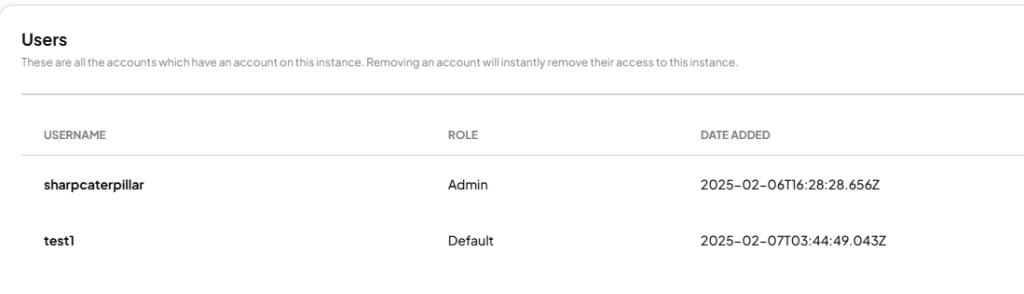
使用用户名和密码创建新用户。
/v1/admin/users/new
禁用方法,直到通过UI启用多用户模式为止。
Allowed roles are: default, admin, managerAnything支持多用户模式,有3种角色的权限管理。
Admin账号,拥有全部的管理权限。Manager账号,可管理所有工作区和文档,但是不能管理大模型、嵌入模型和向量数据库。default账号,则只能基于已授权的工作区与大模型对话,不能对工作区和系统配置做任何更改。
curl -X 'POST' \
  'http://127.0.0.1:3001/api/v1/admin/users/new' \
  -H 'accept: application/json' \
  -H 'Authorization: Bearer <Your Key>' \
  -H 'Content-Type: application/json' \
  -d '{
  "username": "test1",
  "password": "12345678",
  "role": "default"
}'
{
"user": {
"id": 2,
"username": "test1",
"pfpFilename": null,
"role": "default",
"suspended": 0,
"seen_recovery_codes": false,
"createdAt": "2025-02-07T03:44:49.043Z",
"lastUpdatedAt": "2025-02-07T03:44:49.043Z",
"dailyMessageLimit": null
},
"error": null
}
更新现有的用户设置
/v1/admin/users/{id}
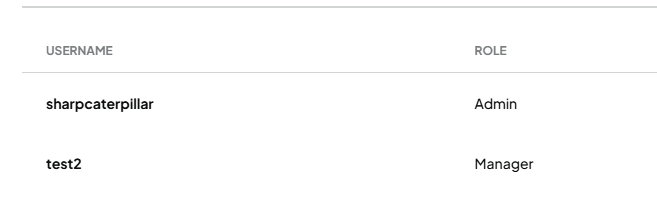
比如我要更新上图中test1的用户信息,那么我的id就要填2,随后更改username、password、role等参数
curl -X 'POST' \
  'http://127.0.0.1:3001/api/v1/admin/users/2' \
  -H 'accept: application/json' \
  -H 'Authorization: Bearer AZFAJKM-K58MAEK-HXXX4F1-3E4JE8Y' \
  -H 'Content-Type: application/json' \
  -d '{
  "username": "test2",
  "password": "hunter2111",
  "role": "manager",
  "suspended": 0
}'
通过id删除用户
/v1/admin/users/{id}
curl -X 'DELETE' \
  'http://127.0.0.1:3001/api/v1/admin/users/2' \
  -H 'accept: application/json' \
  -H 'Authorization: Bearer AZFAJKM-K58MAEK-HXXX4F1-3E4JE8Y'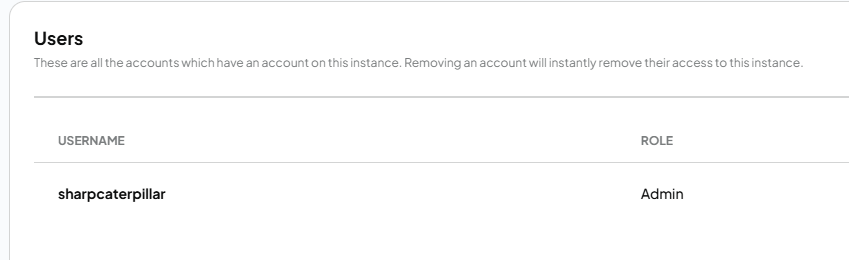
创建一个新的邀请码,供某人用于注册实例
/v1/admin/invite/new
curl -X 'POST' \
  'http://127.0.0.1:3001/api/v1/admin/invite/new' \
  -H 'accept: application/json' \
  -H 'Authorization: Bearer AZFAJKM-K58MAEK-HXXX4F1-3E4JE8Y' \
  -H 'Content-Type: application/json' \
  -d '{
  "workspaceIds": [
    1,
    2
  ]
}'
响应:
{
  "invite": {
    "id": 1,
    "code": "W1VBP6C-B9TMEA2-K7ERB1B-CCG8NZR",
    "status": "pending",
    "claimedBy": null,
    "workspaceIds": "[1,2]",
    "createdAt": "2025-02-07T03:56:53.095Z",
    "createdBy": 0,
    "lastUpdatedAt": "2025-02-07T03:56:53.095Z"
  },
  "error": null
}
列出所有现有的实例邀请
列出所有现有的实例邀请
curl -X 'GET' \
  'http://127.0.0.1:3001/api/v1/admin/invites' \
  -H 'accept: application/json' \
  -H 'Authorization: Bearer AZFAJKM-K58MAEK-HXXX4F1-3E4JE8Y'
{
"invites": [
{
"id": 1,
"code": "W1VBP6C-B9TMEA2-K7ERB1B-CCG8NZR",
"status": "pending",
"claimedBy": null,
"workspaceIds": "[1,2]",
"createdAt": "2025-02-07T03:56:53.095Z",
"createdBy": 0,
"lastUpdatedAt": "2025-02-07T03:56:53.095Z"
}
]
}按 ID 停用(软删除)邀请
按 ID 停用(软删除)邀请
curl -X 'DELETE' \
  'http://127.0.0.1:3001/api/v1/admin/invite/1' \
  -H 'accept: application/json' \
  -H 'Authorization: Bearer AZFAJKM-K58MAEK-HXXX4F1-3E4JE8Y'
检索有权访问指定工作区的用户列表。
/v1/admin/workspaces/{workspaceId}/users
curl -X 'GET' \
  'http://127.0.0.1:3001/api/v1/admin/workspaces/1/users' \
  -H 'accept: application/json' \
  -H 'Authorization: Bearer AZFAJKM-K58MAEK-HXXX4F1-3E4JE8Y'
{
"users": [
{
"userId": 1,
"username": "sharpcaterpillar",
"role": "admin",
"lastUpdatedAt": "2025-02-06T16:29:02.416Z"
}
]
}列出所有当前工作区
/v1/workspaces
curl -X 'GET' \
  'http://127.0.0.1:3001/api/v1/workspaces' \
  -H 'accept: application/json' \
  -H 'Authorization: Bearer AZFAJKM-K58MAEK-HXXX4F1-3E4JE8Y'
{
"workspaces": [
{
"id": 1,
"name": "firstTest",
"slug": "firsttest",
"vectorTag": null,
"createdAt": "2025-02-06T16:29:02.402Z",
"openAiTemp": null,
"openAiHistory": 20,
"lastUpdatedAt": "2025-02-06T16:29:02.402Z",
"openAiPrompt": null,
"similarityThreshold": 0.25,
"chatProvider": null,
"chatModel": null,
"topN": 4,
"chatMode": "chat",
"pfpFilename": null,
"agentProvider": null,
"agentModel": null,
"queryRefusalResponse": null,
"vectorSearchMode": "default",
"threads": []
},
{
"id": 2,
"name": "deepseek-v3",
"slug": "deepseek-v3",
"vectorTag": null,
"createdAt": "2025-02-07T03:05:48.165Z",
"openAiTemp": null,
"openAiHistory": 20,
"lastUpdatedAt": "2025-02-07T03:05:48.165Z",
"openAiPrompt": null,
"similarityThreshold": 0.25,
"chatProvider": null,
"chatModel": null,
"topN": 4,
"chatMode": "chat",
"pfpFilename": null,
"agentProvider": null,
"agentModel": null,
"queryRefusalResponse": null,
"vectorSearchMode": "default",
"threads": []
},
{
"id": 3,
"name": "My New Workspace",
"slug": "my-new-workspace",
"vectorTag": null,
"createdAt": "2025-02-07T06:00:35.409Z",
"openAiTemp": 0.7,
"openAiHistory": 20,
"lastUpdatedAt": "2025-02-07T06:00:35.409Z",
"openAiPrompt": "Custom prompt for responses",
"similarityThreshold": 0.7,
"chatProvider": null,
"chatModel": null,
"topN": 4,
"chatMode": "chat",
"pfpFilename": null,
"agentProvider": null,
"agentModel": null,
"queryRefusalResponse": "Custom refusal message",
"vectorSearchMode": "default",
"threads": []
}
]
}创建新工作区
/v1/workspace/new
curl -X 'POST' \
  'http://127.0.0.1:3001/api/v1/workspace/new' \
  -H 'accept: application/json' \
  -H 'Authorization: Bearer AZFAJKM-K58MAEK-HXXX4F1-3E4JE8Y' \
  -H 'Content-Type: application/json' \
  -d '{
  "name": "My New Workspace",
  "similarityThreshold": 0.7,
  "openAiTemp": 0.7,
  "openAiHistory": 20,
  "openAiPrompt": "Custom prompt for responses",
  "queryRefusalResponse": "Custom refusal message",
  "chatMode": "chat",
  "topN": 4
}'
响应:
{
  "workspace": {
    "id": 3,
    "name": "My New Workspace",
    "slug": "my-new-workspace",
    "vectorTag": null,
    "createdAt": "2025-02-07T06:00:35.409Z",
    "openAiTemp": 0.7,
    "openAiHistory": 20,
    "lastUpdatedAt": "2025-02-07T06:00:35.409Z",
    "openAiPrompt": "Custom prompt for responses",
    "similarityThreshold": 0.7,
    "chatProvider": null,
    "chatModel": null,
    "topN": 4,
    "chatMode": "chat",
    "pfpFilename": null,
    "agentProvider": null,
    "agentModel": null,
    "queryRefusalResponse": "Custom refusal message",
    "vectorSearchMode": "default"
  },
  "message": null
}
通过独特的 slug 获取工作区
/v1/workspace/{slug}
curl -X 'GET' \
  'http://127.0.0.1:3001/api/v1/workspace/my-new-workspace' \
  -H 'accept: application/json' \
  -H 'Authorization: Bearer AZFAJKM-K58MAEK-HXXX4F1-3E4JE8Y'
{
"workspace": [
{
"id": 3,
"name": "My New Workspace",
"slug": "my-new-workspace",
"vectorTag": null,
"createdAt": "2025-02-07T06:00:35.409Z",
"openAiTemp": 0.7,
"openAiHistory": 20,
"lastUpdatedAt": "2025-02-07T06:00:35.409Z",
"openAiPrompt": "Custom prompt for responses",
"similarityThreshold": 0.7,
"chatProvider": null,
"chatModel": null,
"topN": 4,
"chatMode": "chat",
"pfpFilename": null,
"agentProvider": null,
"agentModel": null,
"queryRefusalResponse": "Custom refusal message",
"vectorSearchMode": "default",
"documents": [],
"threads": []
}
]
}按 slug 删除工作区
/v1/workspace/{slug}
curl -X 'DELETE' \
  'http://127.0.0.1:3001/api/v1/workspace/deepseek-v3' \
  -H 'accept: */*' \
  -H 'Authorization: Bearer AZFAJKM-K58MAEK-HXXX4F1-3E4JE8Y'
将工作区权限设置为可供给定用户 ID 和管理员访问
/v1/admin/workspaces/{workspaceSlug}/manage-users
将被授予目标工作区访问权限的用户 ID 数组。reset 将从工作区中删除所有现有用户,仅添加新用户 - default false。
curl -X 'POST' \
  'http://127.0.0.1:3001/api/v1/admin/workspaces/firsttest/manage-users' \
  -H 'accept: application/json' \
  -H 'Authorization: Bearer AZFAJKM-K58MAEK-HXXX4F1-3E4JE8Y' \
  -H 'Content-Type: application/json' \
  -d '{
  "userIds": [
    1,
    3
  ],
  "reset": false
}'
{
"success": true,
"error": null,
"users": [
{
"userId": 1,
"username": "sharpcaterpillar",
"role": "admin",
"lastUpdatedAt": "2025-02-06T16:29:02.416Z"
},
{
"userId": 3,
"username": "test2",
"role": "default",
"lastUpdatedAt": "2025-02-07T07:53:24.093Z"
}
]
}通过其独特的 slug 更新工作区设置
/v1/workspace/{slug}/update
curl -X 'POST' \
  'http://127.0.0.1:3001/api/v1/workspace/firsttest/update' \
  -H 'accept: application/json' \
  -H 'Authorization: Bearer AZFAJKM-K58MAEK-HXXX4F1-3E4JE8Y' \
  -H 'Content-Type: application/json' \
  -d '{
  "name": "secondtest",
  "openAiTemp": 0.2,
  "openAiHistory": 20,
  "openAiPrompt": "Respond to all inquires and questions in binary - do not respond in any other format."
}'
{
"workspace": {
"id": 1,
"name": "secondtest",
"slug": "firsttest",
"vectorTag": null,
"createdAt": "2025-02-06T16:29:02.402Z",
"openAiTemp": 0.2,
"openAiHistory": 20,
"lastUpdatedAt": "2025-02-06T16:29:02.402Z",
"openAiPrompt": "Respond to all inquires and questions in binary - do not respond in any other format.",
"similarityThreshold": 0.25,
"chatProvider": null,
"chatModel": null,
"topN": 4,
"chatMode": "chat",
"pfpFilename": null,
"agentProvider": null,
"agentModel": null,
"queryRefusalResponse": null,
"vectorSearchMode": "default"
},
"message": null
}通过其独特的 slug 获取 workspaces 聊天,无论用户是谁
/v1/workspace/{slug}/chats
curl -X 'GET' \
  'http://127.0.0.1:3001/api/v1/workspace/firsttest/chats' \
  -H 'accept: application/json' \
  -H 'Authorization: Bearer AZFAJKM-K58MAEK-HXXX4F1-3E4JE8Y'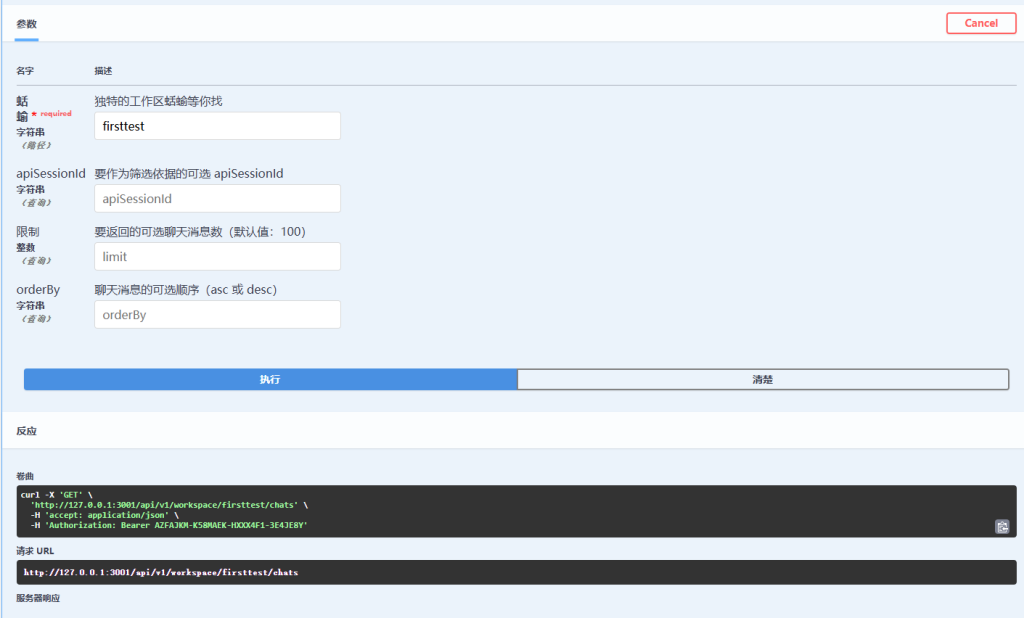
通过其独特的 slug 在工作区中添加或删除文档
/v1/workspace/{slug}/update-embeddings
curl -X 'POST' \
  'http://127.0.0.1:3001/api/v1/workspace/firsttest/update-embeddings' \
  -H 'accept: application/json' \
  -H 'Authorization: Bearer AZFAJKM-K58MAEK-HXXX4F1-3E4JE8Y' \
  -H 'Content-Type: application/json' \
  -d '{
  "adds": [
    "custom-documents/my-pdf.pdf-hash.json"
  ],
  "deletes": [
    "custom-documents/anythingllm.txt-hash.json"
  ]
}'
{
"workspace": {
"id": 1,
"name": "secondtest",
"slug": "firsttest",
"vectorTag": null,
"createdAt": "2025-02-06T16:29:02.402Z",
"openAiTemp": 0.2,
"openAiHistory": 20,
"lastUpdatedAt": "2025-02-06T16:29:02.402Z",
"openAiPrompt": "Respond to all inquires and questions in binary - do not respond in any other format.",
"similarityThreshold": 0.25,
"chatProvider": null,
"chatModel": null,
"topN": 4,
"chatMode": "chat",
"pfpFilename": null,
"agentProvider": null,
"agentModel": null,
"queryRefusalResponse": null,
"vectorSearchMode": "default",
"documents": [
{
"id": 1,
"docId": "1d693ffa-78d9-428d-88d5-048453d4b2bb",
"filename": "url-127.0.0.1_api_docs_-e21874a7-ba88-4617-b084-83353db028dc.json",
"docpath": "custom-documents/url-127.0.0.1_api_docs_-e21874a7-ba88-4617-b084-83353db028dc.json",
"workspaceId": 1,
"metadata": "{\"id\":\"e21874a7-ba88-4617-b084-83353db028dc\",\"url\":\"file://127.0.0.1_api_docs_.html\",\"title\":\"127.0.0.1_api_docs_.html\",\"docAuthor\":\"no author found\",\"description\":\"No description found.\",\"docSource\":\"URL link uploaded by the user.\",\"chunkSource\":\"link://http://127.0.0.1:3001/api/docs/\",\"published\":\"2/7/2025, 4:11:09 AM\",\"wordCount\":27,\"token_count_estimate\":622}",
"pinned": false,
"watched": false,
"createdAt": "2025-02-07T04:11:27.562Z",
"lastUpdatedAt": "2025-02-07T04:11:27.562Z"
}
]
}
}通过工作区中的唯一 slug 在文档中添加或删除 pin
/v1/workspace/{slug}/update-pin
curl -X 'POST' \
  'http://127.0.0.1:3001/api/v1/workspace/firsttest/update-pin' \
  -H 'accept: application/json' \
  -H 'Authorization: Bearer AZFAJKM-K58MAEK-HXXX4F1-3E4JE8Y' \
  -H 'Content-Type: application/json' \
  -d '{
  "docPath": "custom-documents/my-pdf.pdf-hash.json",
  "pinStatus": true
}'
使用工作区执行聊天
/v1/workspace/{slug}/chat
向工作区发送提示和对话类型(查询或聊天)。
查询: 除非有来自vectorDB的相关来源,否则不会使用LLM并且不记得聊天记录。
聊天: 使用LLM带有自定义嵌入的常识来生成输出,使用滚动聊天历史记录。
{
"message": "你是谁",
"mode": "query | chat",
"sessionId": "identifier-to-partition-chats-by-external-id",
"attachments": [
{
"name": "image.png",
"mime": "image/png",
"contentString": "data:image/png;base64,iVBORw0KGgoAAAANSUhEUgAA..."
}
]
}以下是对该API请求参数的详细解读:
1. message
- 作用:用户发送给模型的文本内容(即提问或指令)。
- 示例:
"你是谁"表示询问模型的自我介绍。 - 注意:这是必填的核心字段,决定了模型需要回应的内容。
2. mode
- 作用:指定模型处理请求的模式,可选
query(查询)或chat(聊天)。 - 区别:
query模式:- 仅依赖当前输入和外部数据库(如
vectorDB)的相关信息。 - 不会参考历史对话记录。
- 适用于单次独立查询(如搜索事实性信息)。
- 仅依赖当前输入和外部数据库(如
chat模式:- 使用对话历史(需通过
sessionId关联)和自定义知识库(如LIM)生成连贯回复。 - 适用于需要上下文的多轮对话。
- 使用对话历史(需通过
- 示例:
"mode": "chat"表示开启上下文感知的聊天模式。
3. sessionId
- 作用:唯一标识符,用于区分不同对话会话。
- 功能:
- 在
chat模式下,系统会根据sessionId关联历史对话记录,确保上下文连贯。 - 不同
sessionId的对话历史相互隔离。 - 示例:
"sessionId": "user123-chat-1"可为每个用户或对话场景分配独立ID。
4. attachments
- 作用:附加文件(如图片、文档)的元数据和内容。
- 结构:
name:文件名(如image.png)。mime:文件类型(如image/png表示PNG图片)。contentString:文件的Base64编码内容(用于传输二进制数据)。- 用途:
- 上传图片/文件供模型分析(如OCR识别、图像描述生成)。
- 需确保模型支持附件处理能力。
- 示例:发送图片后,模型可能回复“这是一张风景照,包含山脉和湖泊”。
其他注意事项
vectorDB和LIM:根据文件描述,这两个组件可能分别代表:vectorDB:外部向量数据库,用于存储和检索结构化知识。LIM(可能为自定义模块):结合常识和自定义规则生成回复的逻辑引擎。version相关字段:文件中提到的version和versionStatus可能是系统内部版本控制参数,一般无需用户关注。
使用建议
- 若需连续对话,使用
chat模式 + 固定sessionId。 - 若需单次独立查询(如搜索资料),使用
query模式。 - 发送附件时,确保模型支持对应文件类型(如图像模型需启用视觉能力)。
请求示例:
curl -X 'POST' \
  'http://127.0.0.1:3001/api/v1/workspace/firsttest/chat' \
  -H 'accept: application/json' \
  -H 'Authorization: Bearer AZFAJKM-K58MAEK-HXXX4F1-3E4JE8Y' \
  -H 'Content-Type: application/json' \
  -d '{
  "message": "你是谁",
  "mode": "chat",
  "sessionId": "firstchat"
}'
使用工作区执行可流式传输的聊天
/v1/workspace/{slug}/stream-chat
示例值:
{
  "message": "What is AnythingLLM?",
  "mode": "query | chat",
  "sessionId": "identifier-to-partition-chats-by-external-id",
  "attachments": [
    {
      "name": "image.png",
      "mime": "image/png",
      "contentString": "data:image/png;base64,iVBORw0KGgoAAAANSUhEUgAA..."
    }
  ]
}
Comments NOTHING